

Ebservant is reader-supported: some links on this page are affiliate links, and as an Amazon Associate Ebservant earns from qualifying purchases at no extra cost to you. Learn more.
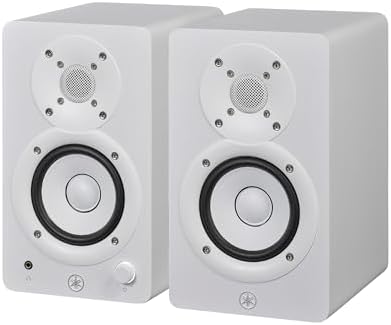
You must ensure your workspace can accommodate the 3.5″ cone woofer and verify your room’s acoustic treatment to prevent resonance. To begin, measure your desk depth to ensure the 2-way bass-reflex powered speaker—a set of high-fidelity speakers with built-in amplifiers—has enough clearance for the rear port to function without causing port noise.
Yamaha HS3 frequency response limits and the need for subwoofers
The Yamaha HS3 features a 3.5″ cone woofer and a 0.75″ dome tweeter, providing a frequency response of 70 Hz to 22 kHz at -10 dB. Because these are powered speakers, the internal 26 W + 26 W output power handles the amplification, but the small driver diameter limits the physical displacement of air required for deep bass. We selected the Yamaha HS3 for this comparison because it represents a common entry point for desktop monitoring. For a powered speaker system, knowing the low-end limit is vital because the internal amplifier’s power is tied to the physical size of the cone; a smaller cone cannot physically move enough air to reach sub-bass frequencies regardless of power. If you choose a monitor that lacks the required low-end reach, you will find your mixes lack weight in the lower registers, forcing you to spend more on external hardware later. You first place the monitors on your desk, notice the lack of sub-bass in your kick drums, and eventually realize you need a separate subwoofer to fill the 70 Hz gap.
For a quick summary of the performance, see our final verdict on the Yamaha HS3.
What to Check Before Buying the Yamaha HS3
- Verify if your project requires sub-bass below 70 Hz, as this speaker will not reproduce those frequencies.
- Measure the physical space behind the unit to ensure the bass-reflex port has clear air for heat and sound dissipation.
- Determine if you need to purchase a dedicated subwoofer to reach standard sub-bass frequencies for your specific mix.
- Check your desk surface for vibrations, as surface resonance can muddy the 3.5″ woofer’s output and affect clarity.
- Assess your room’s acoustic treatment to prevent low-end build-up or “boomy” resonance in small spaces.
Choosing the Right Monitor for Your Space
The Yamaha HS3 is suited for users who prioritize a compact footprint and clear high-frequency detail for near-field monitoring. If you require deep, impactful bass for professional mixing or large-scale sound reinforcement, you should look for monitors with larger driver diameters or a dedicated subwoofer. Buyers seeking a full-range studio experience without external hardware should prioritize models with a lower frequency response floor.
You can find answers to common questions in the Yamaha HS3 frequently asked questions.
If you need to reproduce deep low-end frequencies for professional studio work, choose a monitor with a larger woofer or a dedicated subwoofer system.
Many users wonder if the Yamaha HS3 provides high-fidelity desktop audio.
Warranty details: see the official Yamaha warranty page.
Browse our other self-powered speaker pages
- Which Powered Speaker System Works Best for an Outdoor Fitness Class?
- The Powered Speaker Systems That Work Best for a Beach Trip
- The Powered Speaker Systems That Work Best for Karaoke
- Which Studio Monitors Are Best for Music Production?
- Best Portable Bluetooth Speaker Systems with Battery
- Budget Powered Speaker Systems for Mobile DJs Compared