

Ebservant is reader-supported: some links on this page are affiliate links, and as an Amazon Associate Ebservant earns from qualifying purchases at no extra cost to you. Learn more.
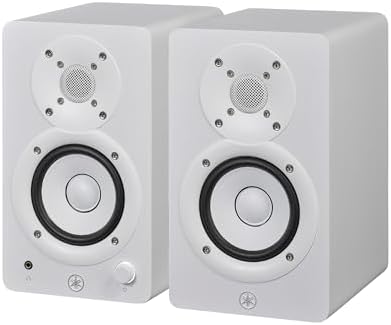
You need a workspace where you can sit within 3 feet of the drivers for near-field monitoring, which is the practice of listening to speakers placed very close to the ears to capture detail.
Yamaha HS3 speaker dimensions and power output for desktop use
The Yamaha HS3 features a 3.5″ cone woofer and a 0.75″ dome tweeter to manage its frequency response. While this range covers the high-fidelity requirements for most desktop tasks, the 70 Hz floor means it lacks deep sub-bass. Because powered speaker systems rely on internal amplifiers to drive the drivers, the 26 W + 26 W output power is sufficient for a desk but lacks the volume for large spaces. We selected this model for our comparison because it serves as a standard entry point for small-format studio monitors. Does your desk have enough depth to clear the speaker’s footprint? You should measure your available surface depth; if you have less than 6 inches of clearance in front of the speakers, the 3.5″ drivers may require angled placement to maintain clarity.
You can find our final verdict on the Yamaha HS3 performance summary to see if it meets your needs.
What to Check Before Buying the Yamaha HS3
Because these are active speakers that plug into a wall outlet, you should verify your power needs before installation. Check your available power strip to ensure it can support the 26 W draw per speaker without tripping a breaker.
For a deeper dive into the hardware, look at the Yamaha HS3 technical specifications provided in our review.
- Measure your desk depth to ensure the speakers do not obstruct your mouse or keyboard workspace.
- Identify if your room requires acoustic treatment, such as foam panels, to stop sound from bouncing off the desk surface.
- Verify that your power source can handle the constant draw of two powered units.
- Determine if you need a dedicated subwoofer, as the 70 Hz limit means this model won’t provide deep bass for heavy electronic music.
Choosing the Right Desktop Monitor
The Yamaha HS3 is a pair of compact, powered studio monitors designed to deliver accurate sound in small spaces. Buyers who prioritize a small physical footprint and clear high-frequency reproduction will find this model suitable for a crowded desk. However, if your work requires heavy low-end reproduction for film scoring or club-style production, you should look at larger monitors with 5-inch or 8-inch woofers. Larger drivers provide the physical surface area needed to move more air and reach lower frequencies than a 3.5″ cone can achieve.
If you are concerned about bass, see if the Yamaha HS3 handles low-end frequencies for studio tasks.
You should choose the Yamaha HS3 if you need a compact, high-fidelity setup for near-field monitoring on a desk where space is limited. If you require deep, room-filling bass or high-volume output for large environments, consider a larger speaker system with higher wattage.
Many users find it helpful to compare these against our guide on top powered monitors for desktop computer setups.
Warranty details: see the official Yamaha warranty page.
Every powered speaker guide in this category
- Best Portable Bluetooth Speaker Systems with Battery
- Budget Powered Speaker Systems for Mobile DJs Compared
- Choosing the Best Powered Monitors for Desktop Computer Use
- The Powered Speaker Systems That Work Best for Near Field Monitoring
- Which Bluetooth Speaker Is Best for Tailgating?
- Best Powered Speaker Systems for Small Venues Under $400