

Our Top 3 Picks for Beginners
The best mesh wifi system for beginners is the Amazon eero 6+ 3-pack which covers 4,500 sq.
If you read one thing on this page, read these 3.
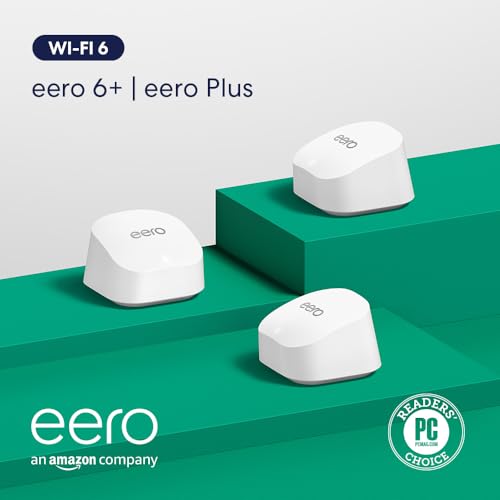
#1 – Amazon eero 6+ 3-pack
Best for: large homes requiring extensive coverage and high device capacity.
Why the Amazon eero 6+ 3-pack is our #1 pick
- Listed at $209.99 in November 2026 – premium among those compared; the price moves, so check it
- 4.4 rating from 9,996 ratings
Coverage Area: 4,500 sq. ft. · Max Device Capacity: 75+ devices
To put that coverage area in context, pick #2 states 3,000 sq. ft. and pick #3 states 3,800 sq ft.

#2 – Amazon eero 6
Best for: standard homes seeking a simple WiFi 6 mesh network with a built-in smart home hub.
Why the Amazon eero 6 is our #2 pick
- Listed at $139.99 in November 2026 – mid-range among those compared; the price moves, so check it
- 4.4 rating from 28,313 ratings
Coverage Area: 3,000 sq. ft. · Max Device Capacity: 75+ devices
For comparison on coverage area, pick #1 states 4,500 sq. ft. and pick #3 states 3,800 sq ft.

#3 – TP-Link Deco S4
Best for: budget-conscious users needing a reliable mesh system for a medium-sized home.
Why the TP-Link Deco S4 is our #3 pick
- Listed at $109.99 in November 2026 – entry among those compared; the price moves, so check it
- 4.6 rating from 15,321 ratings
Coverage Area: 3,800 sq ft · Max Device Capacity: 75 devices
Against the other picks on coverage area, pick #1 states 4,500 sq. ft. and pick #2 states 3,000 sq. ft..
If you need a mid-range option, see our full review of the Deco X20.
How EB Servant picked: we started from the 135 most-reviewed mesh wifi system listings in our retail dataset, removed duplicates, accessories and off-category products, and 97 qualified. The picks on this page were selected from those 97 candidates against this topic’s requirements. The order of the picks reflects fit to this topic; each shows its rating and the number of ratings behind it, so you can weigh how much to trust it. Specifications come from manufacturer listings and ratings from verified Amazon buyer reviews (data checked November 2026).
Our Pick and How the List Was Built
Setting up a mesh wifi system (mesh wireless fidelity system) can be daunting for those who want a “plug and play” experience without configuring complex IP tables or advanced routing rules. A user-friendly app interface is often more important than raw throughput for a first-time owner.
The Amazon eero 6+ 3-pack is designed for this simplicity, offering guided setup and remote management for its 4,500 sq. ft. coverage area. You might prefer the Amazon eero 6 if you only need 3,000 sq. ft., or the TP-Link Deco S4 for a 3,800 sq. ft. range at a lower cost.
We chose these specific systems after screening 97 Mesh Wifi Systems at EB Servant and comparing 10 products in our final review. The selection covers a price range from $109.99 to $209.99, with the median price of the 10 products in our comparison being $134.99.
View our article scope to see which specific mesh systems and technologies are included in this guide.
Check the minimum requirements to ensure your home internet speed and hardware meet the necessary standards.
See our top picks for a quick glance at the best beginner-friendly mesh systems available today.
What the Data Says About Mesh Routers for Beginners
- Top pick: Amazon eero 6+ 3-pack at $209.99 (Coverage Area: 4,500 sq. ft.).
- Also picked: Amazon eero 6 at $139.99; TP-Link Deco S4 at $109.99.
- We compared 10 Mesh Wifi Systems, from $103.68 to $299.99, median $134.99.
- Best buyer rating in the comparison: TP-Link Deco S4 at 4.6/5 from 15,321 ratings.
- Not covered by these picks: get a plug and play wifi system for a very large home – needs 5,000 sq ft, and none of the picks reaches it.
Mesh Wifi Systems for Beginners Compared Side by Side
| Product | Price | Rating | Max Device Capacity |
|---|---|---|---|
| Amazon eero 6+ 3-pack | $209.99 | 4.4 (9,996 ratings) | 75+ devices |
| Amazon eero 6 | $139.99 | 4.4 (28,313 ratings) | 75+ devices |
| TP-Link Deco S4 | $109.99 | 4.6 (15,321 ratings) | 75 devices |
| TP-Link Deco X20 | $109.98 | 4.5 (14,845 ratings) | Not stated |
| TP-Link Deco Whole Home Mesh WiFi System Deco M5 | $103.75 | 4.5 (594 ratings) | Not stated |
| Linksys AX4200 Smart Mesh Wi-Fi 6 Router | $103.68 | 4.0 (1,161 ratings) | 40+ devices |
| Linksys WHW0203 Velop Home Mesh Wi-Fi System | $129.99 | 4.3 (579 ratings) | Not stated |
| TP-Link Deco XE70 Pro | $149.98 | 4.4 (3,925 ratings) | 200 Devices |
| TP-Link Deco XE75 Pro AXE5400 | $299.99 | 4.3 (3,256 ratings) | 200 devices |
| Google Nest WiFi Pro G6ZUC | $299.95 | 4.0 (2,332 ratings) | Not stated |
Prices are approximate and move frequently – check the current price before deciding. “Not stated” means the manufacturer listing does not give that figure – we do not estimate it.
Among our top picks, the TP-Link Deco S4 is the value leader because it costs $1.47 per device for 75 devices.
Each Pick for Beginners, Examined One by One
The 3 picks below are reviewed in the same order as the cards above.
Amazon eero 6+ 3-pack
We selected the Amazon eero 6+ 3-pack because of its high user rating and a simplified setup process that makes it a reliable entry point for beginners. It offers a balance of high-capacity connectivity and a straightforward management app.
What we like: This system supports 160 MHz radio channels, which provides wider lanes for data transmission compared to standard WiFi 6. The 3-pack covers 4,500 sq. ft., and the eero Plus subscription includes features like ad blocking and content filters.
Keep in mind: The 4,500 sq. ft. coverage area measures the distance the signal reaches, so it may not reach through every thick wall in a larger home. This model is best for those who need a 3-pack configuration for larger spaces.
Amazon eero 6
The Amazon eero 6 made the list for its massive review count and a 2-pack configuration that simplifies whole-home coverage. It provides a high-capacity connection for users who want a stable mesh network without complex configurations.
What we like: This 2-pack supports 75+ connected devices and includes a Zigbee smart home hub for connecting compatible smart devices. It offers a 3,000 sq. ft. coverage area and supports the WiFi 6 standard.
Keep in mind: This model covers 3,000 sq. ft., which may be insufficient for very large homes requiring more nodes. It is a strong choice for those prioritizing a 2-pack setup at a lower price point.
TP-Link Deco S4
The TP-Link Deco S4 is included for its budget-friendly price and a simple app-based setup that is ideal for beginner-friendly mesh router needs. It provides a reliable way to create a single network name across a home.
What we like: This 2-pack covers 3,800 sq. ft. and supports up to 75 devices simultaneously. It includes parental controls to limit online time and block specific websites for family members.
Keep in mind: This model uses AC1200 speeds, which is a lower standard than the WiFi 6 found on other picks. It is best suited for users who need basic coverage rather than high-speed WiFi 6 performance.
A budget mesh wifi system is often enough for a basic home if your primary goal is consistent coverage rather than maximum throughput. While high-end systems offer WiFi 6E or 6 GHz bands to avoid frequency congestion in dense areas, the 3,000 to 4,500 sq. ft. coverage provided by these models covers most standard residential needs. You can save money by choosing a budget system like the Deco S4 if you do not need the higher speeds of WiFi 6, as the coverage area and device capacity remain similar across these tiers.
Consult the buying guide to understand the key criteria you should consider when choosing your own network.
How to Choose a Mesh Wifi System for Beginners
Mobile App Configuration for Easy Mesh Wifi System Setup
Prioritize a mesh wifi system with a dedicated app for setup and remote management to simplify your initial configuration. The Amazon eero 6+ 3-pack and Amazon eero 6 both provide setup guidance and remote network management through the eero app. The TP-Link Deco S4 allows for setup via the Deco app on Android or iOS, which provides guest WiFi control and parental controls. These apps allow you to manage your network without accessing a complex router interface. A dedicated app is what puts a simple whole home wifi experience in reach for beginners while keeping advanced settings hidden.
Automatic Firmware Updates to Keep Mesh Networks Secure
Look for a system that handles security and performance updates automatically to ensure your mesh network stays current without manual intervention. The Amazon eero 6 provides automatic updates to maintain the system’s functionality. While the TP-Link Deco S4 and Amazon eero 6+ 3-pack do not state a specific update mechanism in their specifications, most modern mesh routers include this as a standard feature to maintain security. Automatic updates prevent the need for you to manually check for and install software patches.
Plug and Play Hardware for Simple Mesh Wifi Installation
Choose a system that emphasizes a plug and play wifi system experience, which means the hardware is designed to be operational with minimal technical configuration. The Amazon eero 6+ 3-pack and Amazon eero 6 are designed for ease of use, utilizing TrueMesh technology to route traffic automatically. The TP-Link Deco S4 also offers a plug and play experience by allowing devices to automatically switch between units. These systems are designed to be much simpler than enterprise-grade Wi-Fi 6E/7 Access Points, which provide the performance ceiling for consumer-grade mesh hardware but require complex professional configuration. How many nodes do you actually need to cover your house? You can determine this by matching your square footage to the coverage area, such as the 4,500 sq. ft. provided by the Amazon eero 6+ 3-pack.
Node Placement Ease Using Deco Mesh Technology
Weigh node placement ease by looking for systems that use mesh technology to create a single network name and password across your home. The TP-Link Deco S4 features Deco Mesh technology, which allows 2 units to create a WiFi mesh network where devices switch between units automatically. The Amazon eero 6+ 3-pack uses TrueMesh technology to route traffic across its 3-pack. These mesh nodes—multiple units that work together to extend your signal—ensure you do not have to manually manage different access points. Because these systems create a unified network, you can place nodes in different rooms to eliminate dead zones without reconfiguring your devices.
Consistent Signal Handoff Between Mesh Wifi Units
Ensure your mesh wifi system supports consistent signal handoff, which allows your device to stay connected as you move between different areas of your home. The TP-Link Deco S4 facilitates this by allowing devices to automatically switch between units. The Amazon eero 6+ 3-pack and Amazon eero 6 use mesh technology to manage these transitions seamlessly. This is a key difference from basic extenders; a mesh system manages the handoff so your connection does not drop when you move from one room to another. While the Amazon eero 6+ 3-pack and Amazon eero 6 use the WiFi 6 standard to help users choose between WiFi 5 and WiFi 6 speeds, the handoff logic is what ensures a stable connection during movement. Is a tri-band system necessary for your home? A tri-band system provides a third radio band for backhaul, whereas the dual-band systems on this list use two bands to handle both your devices and the communication between nodes. The Amazon eero 6+ 3-pack and Amazon eero 6 both support 75+ devices, which is a high capacity for a dual-band system.
Use the comparison table to see the technical specifications of each system side by side.
Use the audience checklist to identify which specific model best matches your household’s unique needs.
Determining the right scale is vital, so learn how to choose your node count.
What Each Job Calls For vs What These Picks State
Match the job you actually need done to the figure it calls for, then check which picks state that figure or more. Where none do, the row says so.
| What you want to do | The figure it calls for | Picks at or above it |
|---|---|---|
| set up a simple mesh network | 2 units | eero 6, Deco S4 |
| provide easy home wifi setup for a medium home | 3,000 sq ft | eero 6, Deco S4, eero 6+ 3-pack |
| get a beginner friendly mesh router for a large home | 4,500 sq ft | eero 6+ 3-pack |
| get a plug and play wifi system for a very large home | 5,000 sq ft | none of these; a high-end tri-band system would be required |
These figures are the levels this category is generally held to, not manufacturer claims. A pick at or above a figure states that number; how it reaches it and the rest of your setup still decide the job, so check them against your own workload before buying.
Who Buys Mesh Routers, and What It Really Costs
Who buys a mesh router, and what each one needs
- Remote administrative assistants — a system that handles frequency congestion (interference from nearby networks) in urban apartments
- Home office hobbyists — a system that supports WiFi 6E (6GHz band) to provide a dedicated spectrum for work
- Small-scale landlords — a system with a high Max Device Capacity (total simultaneous connections) for multiple tenants
- Streaming gamers — a system that avoids the Half-Duplex Bottleneck (using one radio for two tasks) to maintain steady speeds
- Smart home beginners — a system with a large Coverage Area (physical distance signal reaches) to connect devices in every room
What a mesh wifi system really costs, and where to buy one
What to budget for on top of the mesh wifi system
- Ethernet cables — needed to establish an Ethernet Backhaul (wired connection between nodes) for faster speeds
- Power strips — needed to provide electricity to multiple nodes placed around the home
- Network switches — needed to expand wired ports if the mesh nodes have limited physical inputs
What you can leave out of the budget
- WiFi extenders — unnecessary because a mesh system provides a more cohesive network
- High-gain antennas — unnecessary as mesh nodes have built-in antennas designed for coverage
- MoCA adapters — unnecessary unless the buyer specifically needs to send data over existing cable TV wiring
Where this kind of product is normally sold
- Big-box electronics retailers — offer immediate local pickup and standard return windows
- Online marketplaces — provide frequent bundling options and competitive pricing structures
- Specialty technology stores — offer hands-on demonstrations and technical setup assistance
Review setup and warranty details to understand the installation process and the support provided by each manufacturer.
Explore the detailed reviews to see a deep dive into the performance of every recommended model.
Find answers to common questions in the FAQ section before you make your final decision.
Getting Started with Any of These Picks
Setting up your mesh network
Connecting a new mesh router to your home network involves a few specific requirements to ensure the system functions as intended. Each of these systems requires a standard power outlet to operate.
- The Amazon eero 6+ 3-pack requires a power source for all three units to provide coverage across 4,500 sq. ft.
- The Amazon eero 6 2-pack requires power for two units to cover 3,000 sq. ft.
- The TP-Link Deco S4 requires a power source for the 2-pack to cover 3,800 sq. ft.
Verifying your mesh router on arrival
Warranty and return terms differ by seller and country, so verify the hardware before the return window closes.
- Confirm the number of units matches your order (e.g., 3-pack, 2-pack, or 1 system) to ensure you have the correct coverage area.
- Check that each node powers on and displays a status light, as a non-functioning unit can prevent the mesh from forming.
- Verify the physical condition of the antennas and ports, as these are the primary points of connection for your home network.
- Test the connection to your gateway—the primary device that links your network to the internet—to ensure the primary node communicates with your modem.
Plug in the primary node and follow the app instructions to set your SSID, the name and password that allows your devices to roam seamlessly between nodes, as soon as it arrives.
Internet provider and modem compatibility
These mesh routers work with most internet providers and modems because they connect to your existing hardware via a standard network connection. If your ISP provides a gateway, you can connect the primary mesh node directly to it. None of the products listed state a specific requirement for a 2.5 Gbps WAN port, which is the reference point for handling multi-gigabit fiber connections without bottlenecking; therefore, these units will function with standard high-speed connections provided by most residential ISPs.
What Buyers Still Want to Know About Mesh Routers for Beginners
How does my connection behave if the power goes out?
A mesh wifi system maintains a local network structure even without power, but requires an active internet source to provide external connectivity. Since these mesh routers rely on a constant power supply to broadcast signals, the local connection will stop until electricity returns.
What happens if my internet service cuts out?
If the internet service cuts out, the mesh wifi system remains active as a local network for devices that do not require external access. While you cannot browse the web, devices can still communicate with each other, such as a phone sending a file to a local printer.
Which mesh wifi system is best for a home with many devices?
The mesh wifi system that is best for a home with many devices depends on your specific count, as the Amazon eero 6+ 3-pack and Amazon eero 6 both state a capacity for 75+ devices. The TP-Link Deco S4 also supports 75 devices, making these three options suitable for high-density households.
Which mesh router is best for a beginner?
The mesh router that is best for a beginner is one with a simplified setup process, such as the Amazon eero 6+ 3-pack which provides setup guidance via an app. For a more budget-friendly entry point, the TP-Link Deco S4 costs around $109.99 and offers a simple single network name and password configuration.
Who Should Skip These Mesh Wifi Systems
To avoid the Hidden Node Problem, where nodes cannot see each other’s transmissions and cause latency, place mesh units in clear lines of sight where possible. The eero 6+ supports a 160 MHz radio channel, which is a wider lane for data to travel through, helping to maintain speed in dense environments.
If you need a system that handles more than 75 devices, none of the options listed here provide that specific capacity. For high-density environments requiring hundreds of concurrent connections, you should look for enterprise-grade Wi-Fi 6E/7 Access Points.
If your home exceeds 5,000 sq. ft., these mesh routers will not provide a single, seamless network across the entire area. You need a larger system to reach that scale.
The rest of our mesh wifi guides
- Which Mesh WiFi System Eliminates Dead Zones in a Large House?
- The Mesh WiFi Systems That Fix Slow Internet in a Home Office
- Best Mesh WiFi Systems for Large Homes
- WiFi 6 Mesh Systems for Gaming Compared
- Choosing the Best Mesh WiFi System for Many Devices
- Which Mesh WiFi System Is Best for Small Apartments?
Ebservant is reader-supported: some links on this page are affiliate links, and as an Amazon Associate Ebservant earns from qualifying purchases at no extra cost to you. Learn more.