

Ebservant is reader-supported: some links on this page are affiliate links, and as an Amazon Associate Ebservant earns from qualifying purchases at no extra cost to you. Learn more.
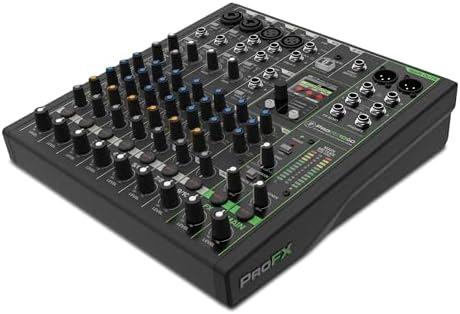
You need a computer with a standard USB-C port to enable these modes, which allow you to capture your mix in different configurations. To begin, select your desired mode using the full-color LCD screen to save and recall your specific settings.
You can find our full review of the ProFX10 GO to see how it performs in various scenarios.
ProFX10 GO USB-C recording modes and hardware features
The ProFX10 GO operates as an analog mixer—a physical console with sliders and knobs used to blend multiple audio sources—and a USB-C audio interface for digital recording. It provides a Standard mode for a full mix with effects, a Loopback mode that includes computer audio, and an Interface mode that records channels 1-2 directly without effects. We selected this model for our comparison because it offers high-resolution GigFX+ effects and Onyx preamps in a portable form factor. For a mixing console buyer, these recording modes are vital because they determine how your hardware interacts with your computer’s software during a live stream or a multi-track recording session. The device supports a 4.4 average rating from 401 buyers and costs around $249.99. While the USB-C connection handles the data, the specific sample rate supported by your host computer’s drivers is not stated in the provided specifications.
Read the final verdict on the ProFX10 GO to see if it meets your specific production needs.
What to Check Before Buying the Mackie ProFX10 GO
Before purchasing this console, verify your specific hardware environment to ensure the recording modes function as intended for your workflow.
View our ProFX10 GO comparison to see how it stacks up against other similar models.
Many users want to know how long the ProFX10 GO battery lasts during a typical session.
- Check if your host operating system recognizes the device as a standard USB-C audio interface without requiring proprietary drivers.
- Verify that your computer’s USB-C port provides sufficient bandwidth for your desired sample rate and multi-track recording requirements.
- Confirm that your recording software supports the Loopback functionality if you plan to stream computer audio alongside your mixer inputs.
- Ensure your workspace can accommodate the 10 input connections if you need to run a podcast with four guests or a DJ set with multiple controllers.
Comparing the ProFX10 GO to Other Mixing Consoles
The ProFX10 GO is suited for users who need a portable, battery-powered solution for mobile setups or small studio environments. If you need to connect a full studio rack of outboard gear or mix a live band with a full drum kit, you should look at alternatives with a higher input count, as this model is limited to 10 inputs. Users who require a high-headroom professional standard for large-scale touring might also prefer consoles with higher channel counts than this entry-level portable unit provides.
If you need more inputs, see our guide to the best 12 channel mixer for recording.
If you need a compact mixer that can switch between standard recording, loopback, and direct interface modes for a podcast or small group session, the Mackie ProFX10 GO is a practical choice.
For those performing live sets, see our list of the best mixing console for djing.