

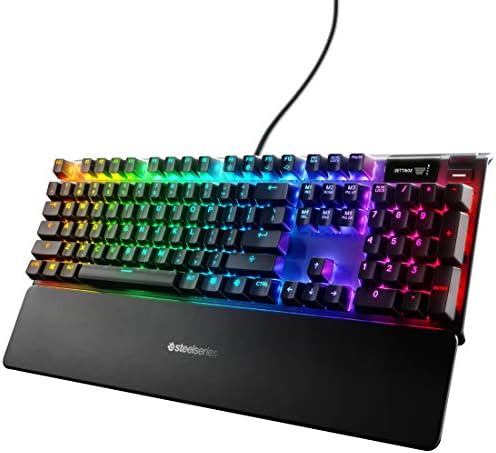
You should measure your available desk surface area to ensure you have at least 18 inches of width and 6 inches of depth to accommodate the unit comfortably. Once you confirm the space, place the keyboard in your primary typing position to verify the clearance for your arms.
The Apex 7 smart display dimensions and stable aluminum alloy body
The Apex 7 features an aircraft grade aluminum alloy body and a weight of 2.1 pounds, which helps it remain stable during use. Because this device includes an OLED smart display—a small screen built into the frame that shows real-time data like Spotify tracks or Discord notifications—you need to ensure the display isn’t obstructed by external objects or your own hands. We selected this keyboard for our comparison because of its unique integrated command center features. Like a dashboard in a car that shows your speed and fuel, the smart display provides a dedicated information hub without cluttering your main monitor. The product dimensions do not specify a dedicated stand or a variable tilting system, so the 1.6-inch height is a fixed clearance requirement.
For a deep dive into the features, see our full SteelSeries Apex 7 review.
What to Check Before Buying the SteelSeries Apex 7
Before purchasing, verify these specific details regarding your workspace to ensure the keyboard fits your setup:
You can find the final verdict in the SteelSeries Apex 7 final rating.
- Confirm your desk surface area is larger than the 5.5 x 17.2 inch footprint.
- Check your cable management path to ensure the corded electric power source has a clear route.
- Verify that there is enough clearance in front of the keyboard for your wrists to rest on the magnetic wrist rest.
- Ensure no nearby objects, such as speakers or lamps, will block the view of the OLED smart display.
Comparing the Apex 7 to Other Gaming Keyboards
The Apex 7 serves users who prioritize integrated information over a minimalist aesthetic. If you prefer a keyboard without any extra screen elements or built-in tracking tools, you might look at standard mechanical options that offer a cleaner profile. This keyboard is designed for those who want a “command center” feel directly at their fingertips.
Check out the SteelSeries Apex 7 technical specifications for a detailed breakdown.
If you want a keyboard that provides real-time game and app tracking while maintaining a sturdy aluminum build, the Apex 7 is the right choice for your desk. If your workspace is too small to accommodate a full-sized layout, you should look for a smaller form factor instead.
Professionals can find the best smart display for video calling on our roundup page.
The other home hub display guides we have published
- Which Smart Display Works Best for Following Workout Videos on a Kitchen Counter?
- The Smart Displays That Show Digital Art in a Living Room
- Best Smart Displays for Video Calling
- Smart Home Hubs for Open Living Spaces Compared
- Choosing the Best Smart Home Hub for Beginners
- The Smart Displays That Work Best for Gaming Setups
Ebservant is reader-supported: some links on this page are affiliate links, and as an Amazon Associate Ebservant earns from qualifying purchases at no extra cost to you. Learn more.