

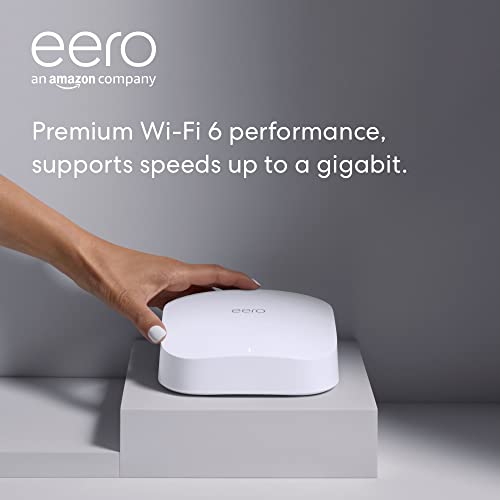
Amazon eero Pro 6
The eero Pro 6 manages 75+ connected devices, so it suits you if your household runs a high-density smart home.
$78 under the category median
- This Smart Display
- $109.99
- Median of the 93 Smart Displays we screened
- $187.53
- Range
- $100.45 to $4698
- Cheaper than this one
- 8 of those 93
Suits remote software engineers
- Remote software engineers
- Parents with multiple kids
- Smart home hobbyists
- Small business owners
4.5/5 from 680 buyers
- Average buyer rating
- 4.5 out of 5
- Ratings behind it
- 680
- What that supports
- A large enough sample to read as a real buyer signal
- Where it comes from
- The product listing, read 26 November 2026
4 deciding specs not stated
- Screen Size
- Not stated in the listing – confirm with the seller before ordering
- Resolution
- Not stated in the listing – confirm with the seller before ordering
- Battery Capacity
- Not stated in the listing – confirm with the seller before ordering
- Power Output
- Not stated in the listing – confirm with the seller before ordering
Will the eero Pro 6 smart display do what you need it for? Tick what applies – 6 things worth checking before you order
This one is $109.99, at or below the $187.53 median of the 93 we screened – it undercuts 82 of them.
The listing does not state it – confirm with the seller before ordering.
The listing does not state it – confirm with the seller before ordering.
The listing does not state it – confirm with the seller before ordering.
The listing says nothing about actual hardware wear; – ask the seller before you order.
The listing says nothing about thermal/noise levels; – ask the seller before you order.
What the eero Pro 6 Is, and Who For
eero Pro 6 manages a network of 75+ connected devices for users who need a mesh Wi-Fi system covering up to 2,000 sq.
Setting up a new smart home often involves configuring multiple separate hubs before you can actually start using your devices. The eero Pro 6 simplifies this by including a Zigbee smart home hub, a standard that lets you connect various smart devices to the network without extra bridges.
We selected the eero Pro 6 for this review because it is one of the 15 chosen from 93 screened smart displays; it is one of the most-rated products that pass screening, with 680 buyer ratings. This model is a fit for users who want a mesh Wi-Fi system that supports up to a gigabit of speed.
We evaluated the smart display options we compared against the buyer’s criteria and selected the ones on this page. This review is for a shopper who needs a mesh Wi-Fi system that handles 75+ connected devices across a large area.
How EB Servant picked: we started from the 109 most-reviewed smart display listings in our retail dataset, removed duplicates, accessories and off-category products, and 93 qualified. This product is one of 15 from that pool chosen for a full review. Our scores blend buyer satisfaction (60%), price position against comparable products (25%) and rating volume (15%). Specifications come from manufacturer listings and ratings from verified Amazon buyer reviews (data checked November 2026).
The Short Answer on the eero Pro 6
Best for: you need a mesh network that supports a high volume of simultaneous connections across a large home.
The eero Pro 6 is a practical choice for this setup at around $109.99.
- Pro: The Wi-Fi 6 standard allows for 75+ connected devices.
- Pro: It includes a Zigbee smart home hub, which lets you control compatible devices without extra hardware.
- Pro: The coverage area reaches up to 2,000 sq. ft.
- Con: The refurbished condition means the packaging may be generic Amazon-branded.
- Con: It only states Alexa compatibility, which may limit options for users requiring other specific voice assistants.
Don’t buy this if: your home layout requires a signal that extends beyond a 2,000 sq. ft. coverage area.
Price assessment: At the $109.99 mark, this price is low for a Wi-Fi 6 mesh node with a built-in Zigbee hub.
EB Servant score: 8.5/10 (data-driven – see “How we picked” above)
For those needing a massive screen, explore our full review of the Echo Show 15.
The Numbers on the Spec Sheet
| Connectivity | Zigbee |
| Voice Assistant | Alexa |
| Smart Home Compatibility | Alexa |
| Wi-Fi Standard | Wi-Fi 6 |
| Coverage Area | Up to 2,000 sq. ft. |
| Wi-Fi Speed | Up to a gigabit |
| Device Capacity | 75+ connected devices |
| Smart Home Hub | Zigbee smart home hub |
The coverage area of up to 2,000 sq. ft. measures the total area the signal reaches.
Practical performance of this Smart Display
Gigabit speeds for 4K streaming and 75+ connected devices
The eero Pro 6 supports Wi-Fi 6 and speeds up to a gigabit, which allows you to handle high-bandwidth tasks like 4K streaming or large file downloads without local network congestion. This capacity supports 75+ connected devices, providing a high enough ceiling for households with numerous smart home gadgets and phones. If you have a high-speed internet plan, this capacity ensures that the router handles the data flow rather than becoming a bottleneck.
Managing your network from anywhere is possible through the eero app guided setup and remote management features, allowing you to troubleshoot for family members or adjust settings while away. Because the eero Pro 6 supports Wi-Fi 6, it handles more simultaneous connections more efficiently than older standards. Choosing a router that cannot handle your device count results in frequent disconnections and slower speeds for every device in your home.
Stable mesh network coverage for up to 2,000 sq. ft
The eero Pro 6 provides coverage for up to 2,000 sq. ft., which determines the physical area where you can expect a stable signal. This coverage area is sufficient for a large apartment or a medium-sized home, ensuring that the signal reaches further into rooms than a single standard router might. You should measure your home’s square footage and ensure it falls within this 2,000 sq. ft. limit to avoid signal dropouts in far corners.
Mesh Wi-Fi technology allows the eero Pro 6 to work with cross-compatible hardware to extend this range further if needed. By using a mesh system, the network maintains a consistent connection as you move between rooms rather than forcing your device to jump between different access points. Failing to account for your home’s layout can lead to “dead zones” where your internet signal fails to reach essential areas.
Built-in Zigbee smart home hub for direct device management
The eero Pro 6 includes a Zigbee smart home hub, which acts as a central controller to connect and manage compatible smart devices without needing extra bridges. This integration allows you to link sensors, bulbs, and plugs directly to your network for easier automation. Since only 6 of the 93 screened listings state they include Zigbee, this is a specific hardware feature that simplifies your smart home setup.
The inclusion of a Zigbee hub means you do not need to purchase a separate hub for your smart home ecosystem, saving you the cost and complexity of additional hardware. It also works alongside Alexa compatibility, which is stated for the eero Pro 6 and 9 of the other options we evaluated. Without a built-in hub, you would have to manage multiple separate bridges to keep your smart devices connected and responsive.
Where the eero Pro 6 Sits Among the Alternatives
The eero Pro 6 provides a Zigbee smart home hub, a feature that allows it to communicate directly with many smart devices without needing extra bridges. While most smart displays focus on screen interaction, this device functions as a central hub for your home network.
Comparison to Similar Products
The eero Pro 6 offers the largest coverage area at 2,000 sq. ft. among the options we evaluated.
- The IceJoy TSU Ultra-Filtration Under Sink Water Filter System is $1 cheaper than the eero Pro 6.
- The MAST TATTOO Mast Archer2 Wireless Tattoo Gun has a 2000 mAh battery, while the eero Pro 6 focuses on a gigabit Wi-Fi speed.
- The Car Air Purifier costs $0.23 less than the eero Pro 6.
If you need a portable power source rather than a mesh network, the CUKTECH 15 Ultra Power Bank is the better pick.
If you prefer a more compact screen, see our full review of the Echo Show 8.
You might also consider the Echo Show 10 spec breakdown for a larger viewing area.
What the Price Buys
At this price point, you receive a Wi-Fi 6 mesh system with a Zigbee smart home hub, which allows you to connect and control compatible smart devices directly. You give up a brand-new unit, as this model is refurbished, and you may receive it in a generic Amazon-branded box rather than original retail packaging.
You should choose the eero Pro 6 if you need to manage more than 75 connected devices or require a Zigbee hub for your smart home setup. If you do not have a large house and do not need to connect a high volume of devices, you can find cheaper options that lack these specific capacities. Count the number of smart devices you currently own; if you have fewer than 75, you may not need the high device capacity of this model.
Where this sits in the buyer data: Among the 65 products screened for this category, this one’s 4.5 rating places it #22, on 680 ratings – above the 92-rating median of that group, so the average rests on more feedback than most of its comparables. On price it undercuts 82 of them.
What It Takes to Run the eero Pro 6
Setting up the eero Pro 6
You need a stable internet connection from your modem to begin the configuration of the eero Pro 6.
- Plug the eero Pro 6 into a power outlet.
- Connect the ethernet cable from your modem to the device.
- Open the eero app to begin the guided setup.
- Follow the app prompts to name your network and set a password.
Verifying warranty and Zigbee hub functionality before purchase
Warranty coverage and support terms vary by seller and country.
- Confirm the device’s serial number matches the listing to ensure valid warranty coverage.
- Verify the Zigbee smart home hub functionality is active to confirm the smart home compatibility.
- Check the hardware version to ensure it is cross-compatible with your existing mesh hardware.
Test the mesh Wi-Fi connection in the furthest room of your home the day it arrives to confirm the 2,000 sq. ft. coverage reach before the return window closes.
Questions Buyers Ask About This Home Hub Display
How much area does the Amazon eero Pro 6 cover?
The Amazon eero Pro 6 covers up to 2,000 sq. ft. of space, which is the range that determines if you need to purchase additional units to reach every room in a large layout. If your home exceeds this square footage, you may need to add more mesh nodes to ensure a stable connection throughout the house.
Does the Amazon eero Pro 6 work with my smart home devices?
Yes, the Amazon eero Pro 6 includes a Zigbee smart home hub, which is a protocol that allows the device to communicate directly with compatible smart bulbs and sensors. Because it supports this standard, you can use it to manage your smart home ecosystem without needing a separate bridge.
Is the Amazon eero Pro 6 compatible with Alexa?
Yes, the Amazon eero Pro 6 supports Alexa for voice assistant functionality and smart home compatibility. You can use voice commands to control your connected devices through the eero system.
How many devices can the Amazon eero Pro 6 handle?
The Amazon eero Pro 6 supports 75+ connected devices, which is the capacity that determines how many smart home gadgets and phones can stay online simultaneously. For a large household with many active electronics, this number ensures the network remains responsive under heavy use.
Is the eero Pro 6 Right for You?
Who the eero Pro 6 suits and the jobs it is the wrong choice for, listed below with the reason for each.
Who this smart display is for, and what it does well
Who the eero Pro 6 suits
- Remote software engineers — high-speed gigabit Wi-Fi and 75+ device capacity for heavy development environments
- Parents with multiple kids — mesh Wi-Fi technology to ensure stable coverage across a 2,000 sq. ft. home
- Smart home hobbyists — built-in Zigbee smart home hub for local device control
- Small business owners — remote management capabilities to monitor the network from anywhere
- Gamers in large houses — Wi-Fi 6 standard to reduce latency and improve connection stability
What this home hub display handles well
- Streaming 4K video — gigabit Wi-Fi speeds
- Managing a smart home ecosystem — Zigbee smart home hub
- Gaming in a large house — mesh Wi-Fi technology
- Running a home office — 75+ connected device capacity
- Easy network deployment — eero app guided setup
What this video smart speaker is the wrong choice for
- Connecting a massive corporate office — 2,000 sq. ft. coverage limit
- High-density apartment complexes — 75+ connected device capacity limit
- Ultra-low latency professional racing — Wi-Fi 6 standard (vs. wired ethernet)
What to budget alongside this smart display, and what to skip
Accessories worth buying with the eero Pro 6
- Ethernet cables — required to connect the router to the modem for internet access
- Modem — required to provide the internet signal the router distributes
- Power outlet — required to provide electricity for the device
- Wall mounts — needed for discreet placement in a 2,000 sq. ft. coverage area
Accessories you can skip buying for this smart display
- Separate Zigbee hub — built-in Zigbee smart home hub included
- External security software — automatic updates and security included
- Dedicated smart home bridge — built-in Zigbee smart home hub included
Where to Buy this smart display
When we looked in November 2026, the eero Pro 6 was listed at $109.99 – a snapshot that may have changed since.
Smart displays are sold by the retailers below – we do not track which of them has the eero Pro 6 in stock, so check availability and the current price with the retailer before making a trip.
- Amazon (online only) — extensive selection of new, refurbished, and like-new stock
- Best Buy (online and physical stores) — in-store pickup and hands-on product demonstrations
- Walmart (online and physical stores) — wide availability for general consumer electronics
- Target (online and physical stores) — convenient in-store availability and standard retail selection
- B&H Photo Video (online only) — specialist electronics retailer with detailed technical specifications
- Costco (online and physical stores) — bulk purchasing and member-only electronics deals
Final Verdict on the eero Pro 6
You should choose the eero Pro 6 if you need a mesh Wi-Fi system to cover a large home and want a device that supports a high volume of simultaneous connections. This refurbished unit is available for around $109.99.
The eero Pro 6 supports 75+ connected devices, which allows you to maintain a stable network even in a busy household with many smart home gadgets. This capacity is a significant technical advantage over many standard routers. The device also includes a Zigbee smart home hub, which allows you to connect compatible smart lights and sensors directly to the router without needing a separate bridge. Do you need a way to manage your smart home devices? The built-in Zigbee hub handles that connectivity for you.
The eero Pro 6 provides a coverage area of up to 2,000 sq. ft. and supports Wi-Fi 6 standards to reach speeds up to a gigabit. Because it is a mesh Wi-Fi technology, you can expand your network’s reach by adding more units that communicate with each other. The 4.5 rating from 680 buyer ratings reflects the experiences of a large group of users who have integrated this hardware into their homes.
Skip it if:
You require a brand-new unit rather than a refurbished device, or if your home layout requires a specific hardware form factor not provided by this model.
The rest of our video smart speaker guides
- Which Smart Home Hub Is Best for Smart Home Automation?
- Best Smart Home Hubs for Large Homes
- Smart Home Hubs for Smart Home Devices Compared
- Choosing the Best Smart Home Hub Under $500
- Viewing Recipes While Cooking With Messy Hands With a Smart Display
- Which Smart Display Works Best for Following Workout Videos on a Kitchen Counter?
Ebservant is reader-supported: some links on this page are affiliate links, and as an Amazon Associate Ebservant earns from qualifying purchases at no extra cost to you. Learn more.