

HDMI Version for QLED TVs should be 2.1 for high-performance needs or 2.0 for standard 4K content. You need 2.1 version to support 4K at 120Hz or 8K at 60Hz, while 2.0 version supports 4K at 60Hz.
Recommended HDMI Version for QLED TV Use Cases
| Use Case | Recommended HDMI Version | Why this number |
|---|---|---|
| Standard 4K Streaming | 2.0 version | Supports 4K at 60Hz with HDR, which covers most streaming services. |
| High-Frame-Rate Gaming | 2.1 version | Required for 4K at 120Hz or 144Hz to ensure smooth motion in modern titles. |
| 8K Content Playback | 2.1 version | Provides the necessary bandwidth for 8K resolutions at 60Hz. |
| VRR and ALLM Support | 2.1 version | Enables Variable Refresh Rate and Auto Low Latency Mode for gaming. |
| Basic HD (1080p) | 1.4 version | Sufficient for standard high-definition signals without 4K requirements. |
Where these choices show up in our reviews
Prices across these 3 run from $199.99 to $397.99; each one has a full review here.


What Happens if You Underbuy or Overbuy HDMI Version?
Underbuying HDMI Version occurs when the hardware limits the signal capacity of the QLED TV. If you connect a 120Hz gaming console to a 2.0 version port, the TV will cap the output at 60Hz. This results in less fluid motion during fast-paced scenes, even if the source device is capable of more. You lose the specific performance gains that higher bandwidth provides, such as Variable Refresh Rate (VRR), which prevents screen tearing during gameplay.
For a more compact display, view our full Hisense 43E6QF review.
Paying for HDMI 2.1 features without compatible source devices
Overbuying HDMI Version involves paying for 2.1 version capabilities when your source devices only support 2.0 version or lower. While a QLED TV with 2.1 version ports is technically superior, it provides no visual improvement if you only stream content from a standard set-top box or a 60Hz gaming console. The cost of 2.1 version hardware is a “future-proofing” expense; you pay for the ability to use high-bandwidth features that you may never actually activate with your current equipment.
What is the Most Common Mistake with HDMI Version?
The most common mistake is assuming the HDMI version of the QLED TV is the only factor determining your signal quality. Many buyers overlook the HDMI cable itself, which must also support the required version to transmit the data. If you have a 2.1 version TV but use an older cable, the TV will default to the lower standard of the cable, limiting your frame rate or resolution.
A mid-sized option is available in our full Hisense 55E6QF review.
Matching HDMI versions across the entire signal chain for optimal performance
Instead of only looking at the TV’s port version, you should optimize for the entire signal chain. This means ensuring your source device (such as a console or PC), your HDMI cable, and your QLED TV all support the same version. For example, to achieve 4K at 120Hz, all three components must support 2.1 version. If any link in that chain is 2.0 version, the entire system is restricted to that lower limit.
How HDMI Version Interacts with Other QLED TV Specs
HDMI Version interacts with the native refresh rate of the QLED TV to determine your maximum performance. A QLED TV with a 60Hz native refresh rate cannot display 120Hz content, regardless of whether the HDMI ports are 2.1 version. The physical panel’s refresh rate acts as a hard ceiling for what the TV can actually show on screen.
For a massive wall display, check out our full Hisense 85E6QF review.
How HDMI 2.1 bandwidth supports high resolution QLED TV pixels
HDMI Version also interacts with the pixel density and resolution of the QLED TV. High-resolution panels require higher bandwidth to move the amount of data needed for each frame. If you have a 4K QLED TV, 2.1 version is the standard for high-performance use because it provides the necessary throughput for high-frame-rate signals. Without it, the TV cannot reach its full potential for gaming or high-motion sports.
Identifying HDMI version bottlenecks that cause choppy gaming movement
When you are sitting on your sofa and notice a game feels choppy despite having a high-end QLED TV, the bottleneck is often the HDMI version. For example, a game like “Call of Duty” requires a 120Hz signal for smooth movement. If your setup is limited to 60Hz because of an older HDMI version, you will see a noticeable drop in fluidity. You should check the “Max HDMI Version” listed in the specifications of your source device. If that number is lower than 2.1, you will not be able to use the higher features of a 2.1 version QLED TV.
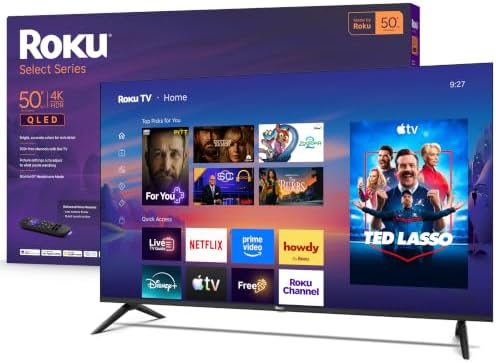
Budget-conscious shoppers can view our full Roku Select Series review.
Saving money with HDMI 2.0 for 4K movie streaming
Conversely, if you are planning to use your QLED TV primarily for watching 4K movies from a streaming stick, you can look for a 2.0 version. These devices typically output at 60Hz, which is the standard for cinematic content. In this scenario, the 2.1 version features are unnecessary, and you can save on costs by selecting a model that provides 2.0 version support. The decision depends entirely on whether your primary activity requires more than 60Hz of motion.
Every quantum dot TV guide in this category
Ebservant is reader-supported: some links on this page are affiliate links, and as an Amazon Associate Ebservant earns from qualifying purchases at no extra cost to you. Learn more.