

Ebservant is reader-supported: some links on this page are affiliate links, and as an Amazon Associate Ebservant earns from qualifying purchases at no extra cost to you. Learn more.
Mixing consoles are audio mixing desks that process multiple signals into a final output, with load-bearing specs including input count, bus count, and sampling rate. You need a console that handles your specific number of microphones and instruments simultaneously, so identify your maximum signal count before choosing a model. A mixing table with 10 inputs is insufficient if you plan to run 12 microphones at once.
Mixing Console Capability and Processing
The number of inputs determines the total quantity of individual audio signals that can be connected simultaneously. While the median number of inputs across our screened listings is 10, you should choose a count that exceeds your maximum expected setup to allow for growth. If you need to connect 12 microphones, a 12-input console leaves no room for extra instruments or expansion.
For wireless connectivity on the go, look at the best bluetooth audio mixer for mobile use.
- Number of Mix Buses – This allows for sub-mixing and group processing, where 6 of the 112 listings we screened state a count from 1 to 16. A higher number of buses allows you to group multiple inputs, such as a drum kit, into a single controllable unit before it hits the main output.
- Number of DSP Effects – These are internal digital processors that provide reverb or delay, with 26 of the 112 listings stating a range from 8 to 380. A higher number provides more variety in built-in sounds, reducing the need for external hardware.
- Sampling Rate – This measures the frequency of snapshots taken per second to convert sound to digital, with 13 of the 112 listings stating a range from 44.1 to 192 kHz. A higher sampling rate, such as 96 kHz, provides more precision during the digital conversion process.
- Bit Depth – This measures the amount of information available to describe the amplitude of each sample, with 27 of the 112 listings stating a range from 16 to 99 bits. A higher bit depth, like 24 bits, provides a higher dynamic range and less noise in the digital signal.
- Gain Stage – This determines the initial signal level before processing, ensuring the incoming audio is at a usable volume without clipping. Proper gain staging prevents distortion before the signal reaches the EQ or faders.
- EQ Band – This allows for frequency shaping and tone correction by adjusting specific ranges of the audio spectrum. More bands give you finer control over the “color” of the sound, such as removing a hum or brightening a vocal.
Where these choices show up in our reviews
Each of the 3 shown here has its own full review on this site; they run from $109.99 to $509.
To understand the different hardware categories, look at the different types of mixing consoles.


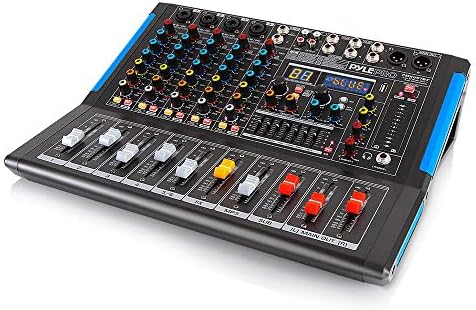
Mixing Console Physical and Power Specs
Power output measures the maximum electrical energy the device can deliver to a load, with 18 of the 112 listings stating a range from 18 to 6,000 Watts. If you are powering active speakers directly from the console, you must ensure the wattage meets the requirements of your speakers. Most users will instead use the console to process signals for an external powered system, making the wattage less critical for the mix itself.
If a hardware board isn’t right for you, browse mixing console alternatives for the same results.
- Rack Mountable – This indicates if the mixing desk can be bolted into a standard 19-inch equipment rack. 12 of the 112 listings state this is possible, while 24 state it is not. Choosing a rackable unit is essential if you have limited floor space or a touring setup.
- Power Output – This measures the maximum electrical energy the device can deliver to a load. For most mixing desks, a higher wattage indicates a larger internal power supply capable of driving more hardware or larger speaker loads.
- Built-in Effects – These are integrated processors that provide common studio effects like reverb or chorus. 84 of the 112 listings state they include these, which saves you from buying separate external units.
Mixing Console Connectivity and Standards
Connectivity types determine how you send and receive audio signals, with 51 of the 112 listings stating Bluetooth and 35 stating USB. Choosing the right connection depends on whether you want to record to a computer, stream wirelessly, or connect to traditional studio gear. If you need to record your mix into a Digital Audio Workstation (DAW), a USB connection is the primary requirement.
You can see a breakdown of costs in what mixing consoles cost at each price level.
- Analog vs. Digital – This determines if the user interacts with physical faders or a remote software interface. Analog consoles use physical circuitry and knobs for every movement, while digital consoles often use screens and menus to change parameters.
- XLR vs. TRS vs. RCA – These dictate the physical connectivity and balanced/unbalanced signal requirements. XLR is the standard for microphones, TRS is preferred for instruments and line signals, and RCA is common for older consumer gear.
- Bluetooth – This allows for wireless audio streaming to or from the console. 51 of the 112 listings state this capability, which is useful for monitoring a phone’s audio or sending a mix to a wireless speaker.
- USB – This allows the mixing console to connect to a computer for recording or playback. 35 of the 112 listings state this, making it a primary choice for home studio users.
- Phantom Power – This provides power to condenser microphones, with 70 of the 112 listings stating it is included. You must have this if you plan to use professional studio microphones.
- Aux Send – This enables routing signals to external monitors or effects. More aux sends allow you to send different mixes to different places, such as a separate headphone mix for a performer.
Mixing Console Accessories and Requirements
To use a mixing console effectively, you often need specific cables and conversion tools to match the inputs and outputs. Using the wrong cable can result in ground hums or signal loss. For example, using an unbalanced RCA cable over a long distance can introduce significant noise into your system.
For a deep dive into that specific model, view our full RPM80BT Mixer Amplifier review.
- XLR Cable – This provides balanced connectivity for microphones. You need an XLR cable to connect a microphone to any input that features an XLR port.
- TRS Cable – This provides balanced connectivity for instruments and line signals. Use a TRS cable to connect a keyboard or a mixer to a powered speaker to prevent noise.
- Phantom Power Supply – This provides power to condenser microphones. While most consoles have this built-in, a separate supply is used if the console lacks the internal circuitry.
- DI Box – This converts high-impedance signals to low-impedance signals. You need a DI box to plug an electric guitar or bass directly into a mixing console without losing signal quality.
- Studio Monitor – This provides accurate audio playback for mixing. Unlike standard speakers, monitors are designed to have a flat frequency response so you can hear the mix accurately.
Mixing Console Terms Often Confused
Buyers often confuse the number of inputs with the number of mix buses, but these measure very different capacities. An input is a physical plug for a microphone, while a bus is a way to group those microphones together for processing.
Many users find value in our full review of the XENYX 1002.
How sampling rate and bit depth affect audio capture quality
Another common point of confusion is the difference between sampling rate and bit depth. Sampling rate determines how many times per second the sound is captured, while bit depth determines how much detail is captured in each of those moments. You need a high sampling rate for timing accuracy and a high bit depth for a wide dynamic range.
You can see how the unit performs in our full review of the Yamaha AG03.
Finally, do not confuse “Power Output” with “Volume.” A console with a 6,000 Watt power rating does not mean it will be louder than a 1,000 Watt console; it simply means it can provide more electrical energy to a load. The loudness of your system is determined by the speakers you connect to the console, not the power rating of the mixer itself.
Check out our full review of the AMX7333 Mixer for a detailed spec analysis.