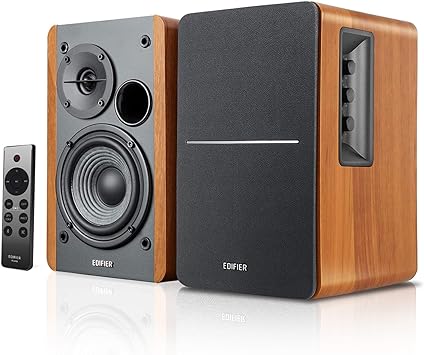
Choose Edifier R1280DB when you want compact powered speakers for desks or small TVs. They offer Bluetooth, optical input, sub-out, and 42W RMS power. These units qualify as bookshelf speakers suitable for nearfield listening.
Choosing Edifier R1280DB for Desktop or Small TV Setups
Edifier R1280DB Bookshelf Speakers suit crowded desks and small television setups when stereo imaging and upgradeability matter. These powered monitors perform well nearfield and plug directly into a TV or PC without amplifier. They provide tonal balance and physical upgrades like a dedicated subwoofer output. First-time buyers find setup simple because controls sit on the active speaker and a remote is included.
Core technical specifications and inputs for quick compatibility checks
- Total power output: 42W RMS (21W + 21W typical channel split)
- Drivers: 4-inch (116 mm) woofer; silk dome tweeter variants 13 mm or 19 mm
- Frequency response options: 51-52 Hz to 20 kHz; SNR 85 dBA
- Inputs: Bluetooth 5.0, Optical (TOSLINK), Coaxial, RCA x2; Subwoofer line out with automatic crossover
- Price example: $159.99 (pair, US retail)
How should I position nearfield speakers on a crowded desk?
Edifier R1280DB delivers tight imaging when placed three feet apart and toeed-in slightly. Place the speakers at ear height or tilt them up with stands like IsoAcoustics for clearer highs. Keep each speaker about 0.9m from your head and 0.9m from the other speaker. Nearfield listening (close personal listening) reduces room reflections and improves clarity for desktop use.
Key factors to weigh when choosing speakers for TV use
Edifier R1280DB Bookshelf Speakers fit TVs when you need cleaner dialogue and flexible inputs. Check your television for optical or coaxial digital outputs for bit-perfect audio to active speakers. Also compare room size, bass needs, and whether you will add a powered subwoofer later. Price, upgrade paths, and remote-control convenience often make these powered bookshelf systems more practical.
Relevant input and connection details to match with your television
- Optical (TOSLINK) and coaxial digital inputs provide low-latency stereo from most modern TVs.
- Bluetooth 5.0 supports wireless streaming but can add latency for gaming.
- Subwoofer line out auto-detect enables adding a Powered sub like SVS SB-1000 or Klipsch R-10SWi.
- Remote and front/side bass/treble knobs simplify daily TV volume and tone adjustments.
What audio connections should my TV support for best results?
TV optical output feeds R1280DB with low latency, yielding clearer dialogue than analog RCA. If your set lacks optical, use an HDMI ARC extractor to route audio to active speakers. Bluetooth works for streaming, but expect mild latency for gaming and occasional compression. Confirm the TV supports PCM stereo over optical to avoid encoded multichannel mismatches.
When Edifier R1280DB Outperforms Soundbar for Small TVs
Edifier R1280DB Bookshelf Speakers beat many budget soundbars for stereo width and upgrade paths. Stereo separation and physical left-right channels improve imaging for movies and music on small screens. The included sub-out lets you add a subwoofer like SVS SB-1000 or Klipsch R-10SWi for deeper bass. At $159.99 they offer better component quality and flexibility than many similarly priced soundbars.
When is desktop speaker clarity better than a TV soundbar?
Edifier Bookshelf Speakers produce clearer vocals than most single-bar soundbars. Nearfield desktop listening puts you close to the speakers, reducing room coloration and boosting detail. This clarity benefits voice-heavy shows, competitive gaming, and music mixing on a PC. The R1280DB maintains low distortion at practical volumes thanks to active amplification design.
Common follow-up questions and quick answers
- Can I use the R1280DB outdoors? No. These speakers are not weatherproof. Choose dedicated outdoor models like Klipsch AW-650 or Polk Atrium series for permanent outdoor installs.
- Do these speakers support HDMI ARC? Not natively. Use TV optical output or an HDMI ARC audio extractor (for example, J-Tech Digital models) to connect HDMI-only sets.
- Will Bluetooth add lag for gaming? Yes. Bluetooth can introduce latency. Use optical or wired RCA for minimal delay when gaming.